Run a Subscription Billing Summary
The Subscription Billing Summary helps you understand how your subscription charges performed over a specific period. It shows how many subscriptions were scheduled to bill, which ones were canceled beforehand, how many charges were attempted, and how much revenue was captured. This report gives you a clear view of your billing health at a glance.
Use Cases
Reviewing a Billing Cycle Performance
You can analyze how a specific billing cycle performed by comparing scheduled billings against successful and failed attempts. This helps you quickly identify anomalies or drops in performance.
Identifying Pre-Billing Cancellations
You can see how many subscriptions were canceled before billing occurred, allowing you to spot churn patterns and adjust retention strategies before the next cycle.
Tracking Approved and Declined Charges
You can monitor approval and decline rates for subscription charges, making it easier to identify payment issues or gateway-related problems.
Measuring Captured Revenue
You can review the total revenue captured from successful billing attempts, helping you reconcile expected versus actual subscription income.
Prerequisites
Before you begin, make sure that:
-
You have access to the Reporting section
-
Subscription billing is enabled for your store
To generate the report, follow these steps:
-
Log in to your Phoenix dashboard.
-
In the left navigation panel, go to Reporting.
-
Click Subscription Billing.
-
Select the date range you want to analyze.
-
Click Search.
The system calculates the results and groups billing activity into cohorts based on the selected date range.
Understand the Report Results
Once the report loads, you can review key metrics for each billing cohort to understand how subscriptions performed during the selected billing cycle. The table below explains what each metric represents and how to interpret it.
| Metric | Description |
|---|---|
| Total Subscriptions Scheduled to Bill | Number of subscriptions expected to be billed during the selected cycle. |
| Subscriptions Canceled Before Billing | Subscriptions that were canceled before any billing attempt occurred. |
| Remaining Active Subscriptions | Subscriptions that remain active after cancellations are applied. |
| Pending Billing Attempts | Subscriptions with billing attempts that are still in progress. |
| Attempted Charges | Total number of charge attempts made during the billing cycle. |
| Approved and Declined Transactions | Breakdown of successful and failed charge attempts. |
| Total Revenue Captured From Approved Attempts | Total amount successfully collected from approved transactions. |
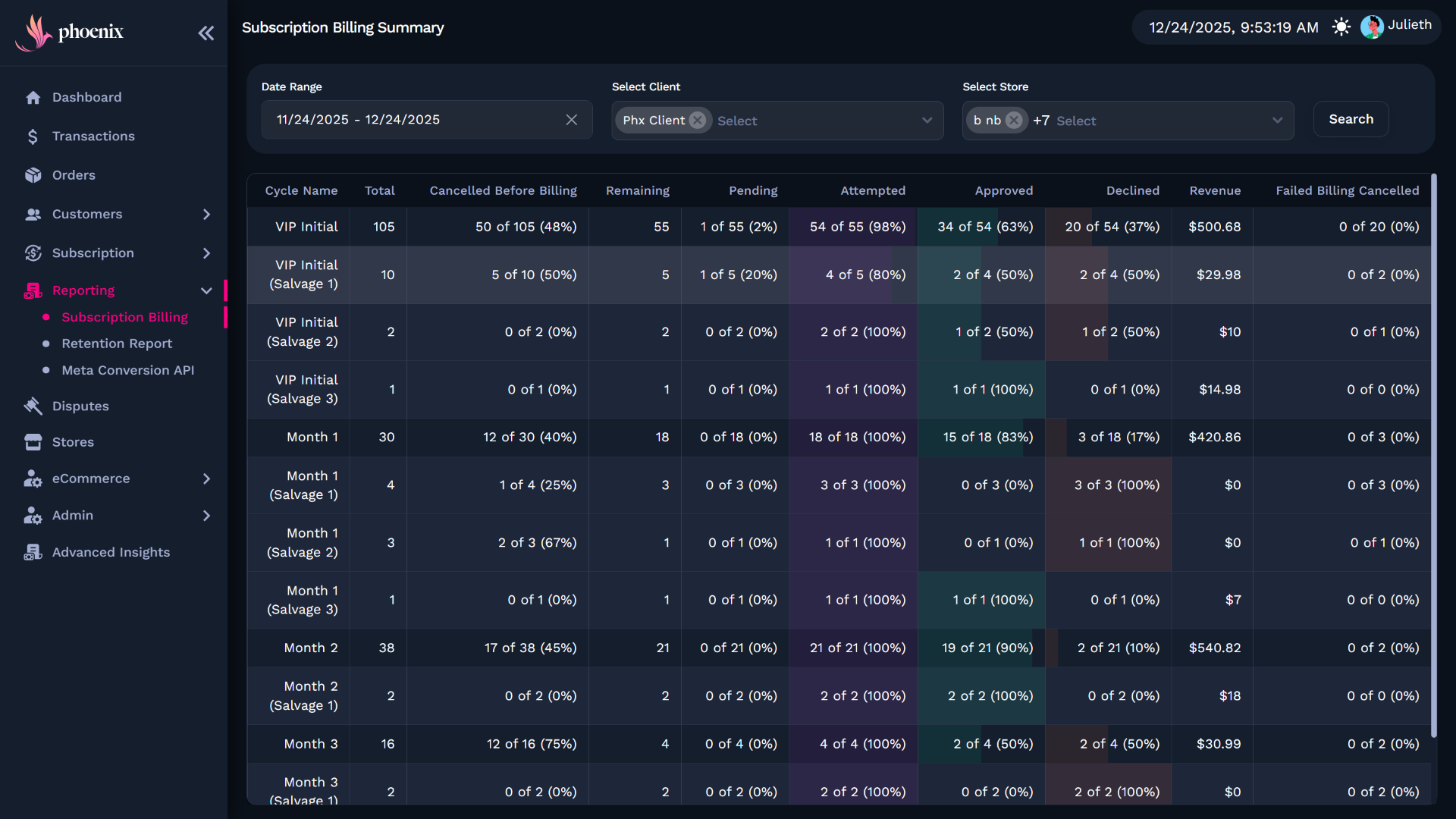
These insights help you quickly assess billing performance and identify potential issues in your subscription lifecycle.
Related Guides
If you want to deepen your understanding of subscription billing performance and revenue behavior, review these guides: